i tested 5 viral claude code guides. here's what they all got wrong.
I fact-checked 5 viral Claude Code articles against the official documentation, the settings schema (68 fields), the hooks reference (26 events), and my own .claude/ setup that runs 16 commands, 6 rules, and hooks in production.
Most of them are copying each other's mistakes.
Bookmark this. You're going to want it next time someone drops a "hidden Claude Code trick" in your timeline.
Let's get into it.
The rubric
I scored every article across 5 dimensions: factual accuracy, depth, completeness, originality, and engagement farming. But the scores aren't the interesting part.
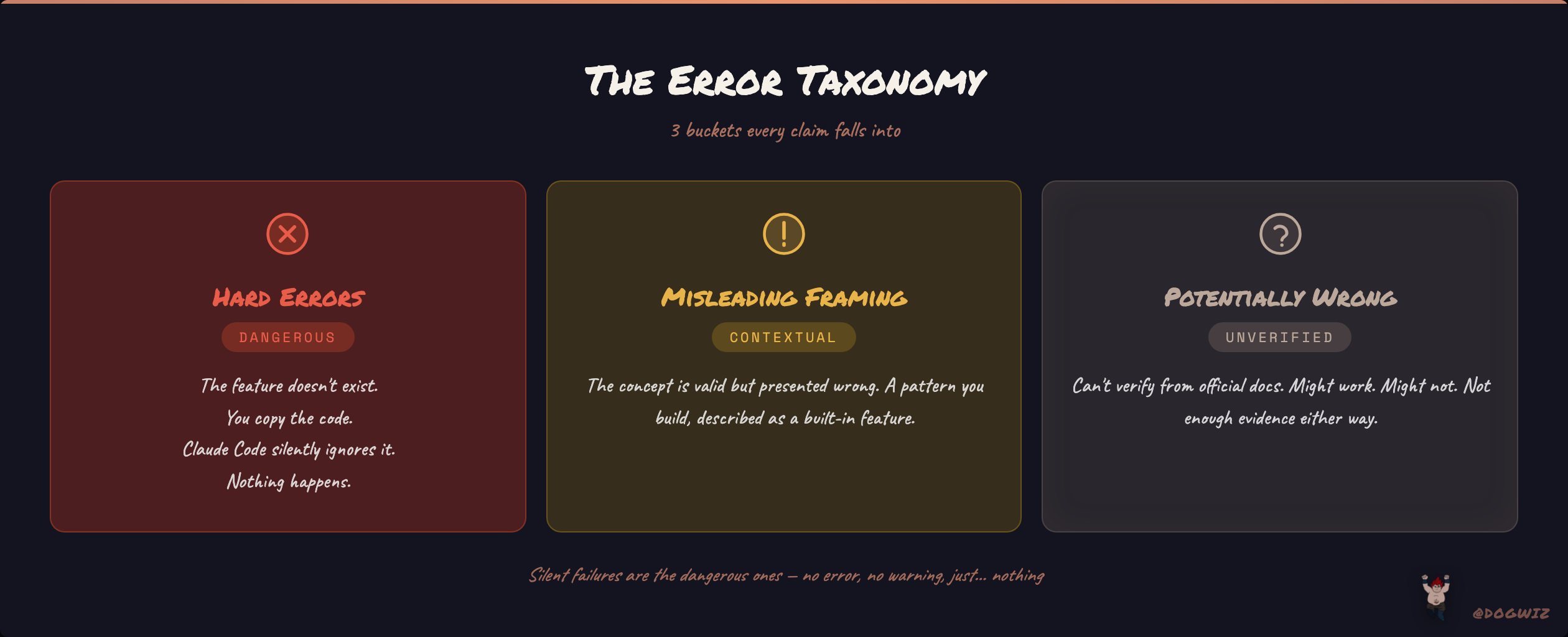
The interesting part is the error categories. I split every claim into three buckets:
Hard errors — the feature or setting doesn't exist. You copy the code, Claude Code silently ignores it. Nothing happens. No warning, no error message. Just... nothing. These are the dangerous ones because you think you configured something and you didn't.
Misleading framing — the concept is valid but the article presents it wrong. Maybe it's a pattern you build, described as a built-in feature. Maybe it's a manual setup, described as auto-generated. The reader gets the right idea and the wrong implementation.
Potentially wrong — I couldn't verify the claim from official docs. It might work. It might not. The author didn't provide enough evidence either way.
Why does this matter? Because Claude Code has a settings schema with 68 fields. If you put a field in settings.json that isn't one of those 68, Claude Code doesn't throw an error. It doesn't warn you. It does absolutely nothing. Your config looks right, feels right, and does nothing. That's why precision matters here more than almost any other tool.
Article 1: @cyrilXBT — "The Hidden Folder That Makes Claude 10x More Powerful"
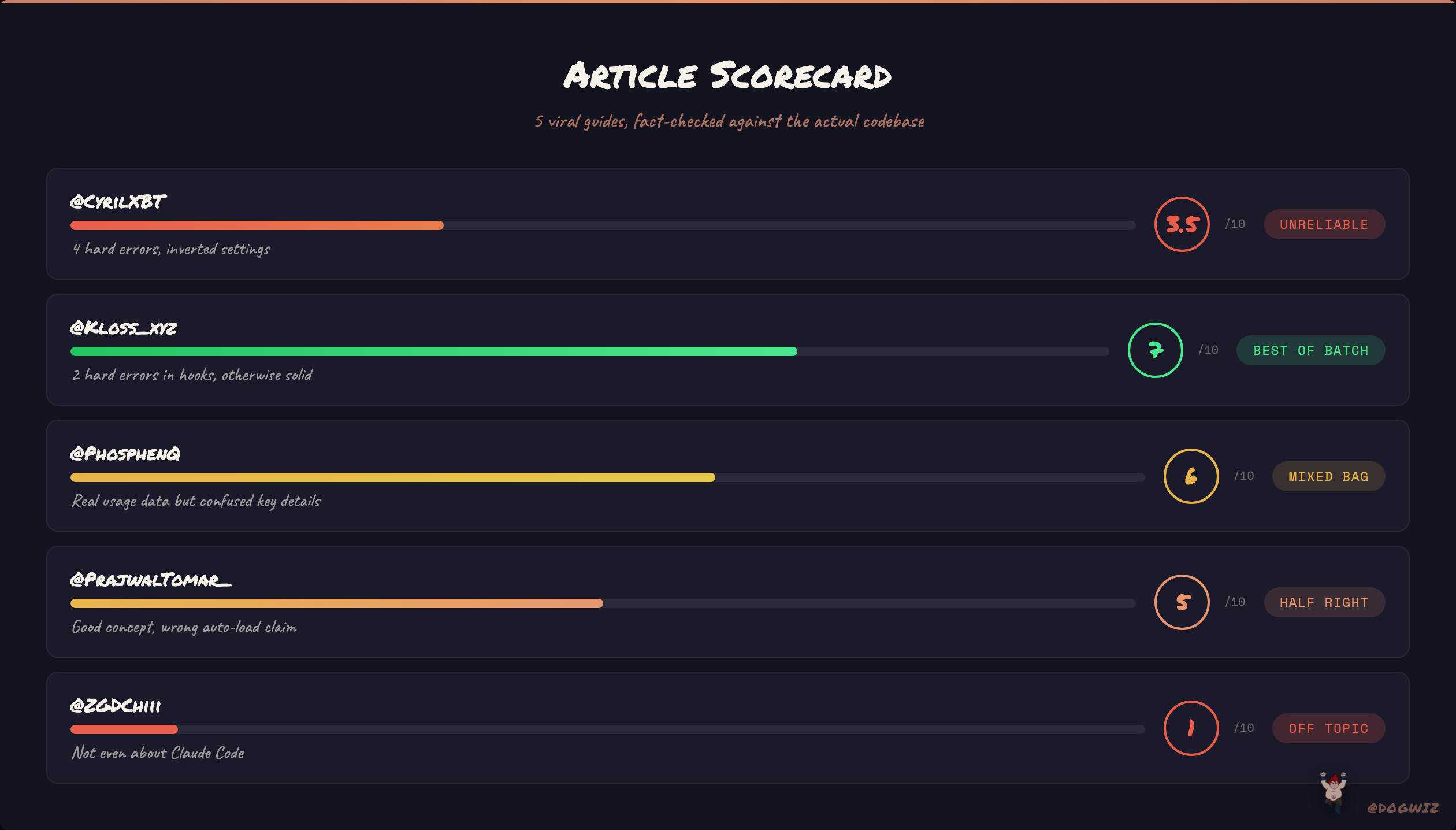
Score: 3.5/10 | 327 likes
The core pitch is right — .claude/ is powerful and most people underuse it. But the article presents a custom organizational structure as the default auto-generated folder layout. It shows you what .claude/ "looks like when you initialize Claude Code in a project" and includes directories like memory/project.md and conversations/[session-id].json that don't exist unless you create them manually.
Then it gets worse. The settings.json example includes 4+ fields that don't exist in the schema:
context.include/context.exclude— not realcommands.directory— not real (it's fixed at.claude/commands/)output.format/output.verbosity— not real (the actual field isoutputStyle, top-level, not nested)memory.enabled/memory.directory— close but wrong names (real fields:autoMemoryEnabled,autoMemoryDirectory, both top-level)
A reader copies this settings.json into their project. Claude Code loads it without complaint. Every single custom field is silently ignored. The reader thinks they've configured context inclusion, output formatting, and memory management. They've configured nothing.
What's actually good: The CLAUDE.md-as-"onboarding doc for a senior developer" analogy is solid. Custom commands explanation is accurate. The persistent project context concept is real. There are valid ideas buried here — but they're buried under fake defaults and invented settings.
Article 2: @kloss_xyz — "everything claude has shipped in 2026 and how to actually use it"
Score: 7/10 | high engagement
This is the most comprehensive article I evaluated. It covers models, Cowork, Code, API, enterprise, channels — the full ecosystem in one piece. Most of the Claude Code section is solid. The line about CLAUDE.md — "Bad CLAUDE.md looks like documentation for a new hire. Good CLAUDE.md looks like notes you'd leave yourself if you knew you'd have amnesia tomorrow" — is genuinely great.
But the hooks section has two hard errors that matter:
"PreCommit" is not a hook event. It doesn't exist. The 26 official hook events are things like PreToolUse, PostToolUse, SessionStart, Stop. There is no PreCommit. The article shows a hook config that fires on PreCommit to block secret commits. That hook never fires. To actually block secrets from being committed, you'd use a PreToolUse hook with a Bash(git commit *) matcher.
"ExitWorktree" is not a hook event. The real event is WorktreeRemove.
One thing I initially flagged as wrong but wasn't: CLAUDE.local.md is real. The article describes it as "personal project overrides, automatically gitignored." I couldn't find it in the docs and called it a hard error. Turns out it exists in the source code (claudemd.ts, auto-loaded at project root as a "Local" type) and was confirmed by an Anthropic engineer in GitHub issue #2394. It's undocumented — removed from the docs during a deprecation confusion — but the article's description of its purpose is actually correct.
The hook config format shown is also wrong — it uses a flat {"command": "..."} structure when the actual schema requires nested hook groups with type, command, and optional matcher fields.
What's actually good: The scope is genuinely impressive. Cowork setup advice is practical and clearly from real use. The decision framework for hooks vs prompts ("if the business would lose money or face legal risk from a single failure, use hooks") is a great mental model. The honest limitations sections — context compaction pain, usage limits, "10% of the time" failure rate — build real credibility. This article is worth reading for everything except the hooks examples.
Article 3: @phosphenq — "Claude Code: The Full Course 2026"
Score: 6/10 | 90 likes
This one surprised me. It has genuinely first-hand observations that prove real usage — the "33,000 token tax" for starting a session without CLAUDE.md is a specific number that you only get from watching your own token counts. The voice input section (recommending Wispr Flow, noting that "speaking is faster than typing, so you stop editing yourself") is rarely covered and practically useful. The context window zones framework (green under 50%, orange at 70%, red at 85%) is actionable advice.
The sub-agents, worktrees, and skills sections are solid. The CI/CD and deployment coverage goes beyond what most articles attempt.
But there's confusion in the details. The --sandbox flag is used first to "kill the confirmation loop permanently" and then to "restrict write access" — those are opposite goals. /init-spinner is presented as built-in but it's a third-party project. /status and /agents interactive wizard may not exist as described.
And the big miss: the article talks extensively about CLAUDE.md rules but never mentions the dedicated rules/ directory. It covers skills but not hooks. It covers settings but not settings.local.json. Same blind spot as everyone else.
What's actually good: The token tax data. The voice input insights. Context zones. Git worktrees for parallel agents. Skills header-only loading mechanism explained correctly. The "one task, one session" rule. Real experience shows through even where the details are off.
Article 4: @PrajwalTomar_ — "Claude Code + NEW Stitch 2.0 just changed how I design apps"
Score: 5/10 | mid engagement
This is a Google Stitch promotional article where Claude Code is the supporting character. The core insight — use a design.md file as a single source of truth for your design system — is genuinely good advice. If you put your colors, spacing tokens, and component patterns in a markdown file and tell Claude Code to follow it, your output gets dramatically more consistent.
But here's the problem: the article says "Claude Code references design.md on every single prompt." It doesn't. Claude Code reads CLAUDE.md files automatically. A random design.md in your project root is not auto-loaded. You'd need to either reference it from CLAUDE.md with an @design.md import, or put it in .claude/rules/, or explicitly tell Claude to read it. The article presents manual setup as automatic behavior.
The article never mentions CLAUDE.md. Not once. The entire design system enforcement could be done properly with CLAUDE.md + a rules/ file that triggers on **/*.tsx paths. Instead, the reader creates a design.md, expects Claude Code to "reference it on every prompt," and wonders why their components still have hardcoded hex colors.
What's actually good: The design.md concept itself. Honest caveats about fonts needing manual nudging and colors not always carrying over. The insight that Stitch generates images before code, which is why the designs feel more polished.
Article 5: @zodchiii — "10 Claude Workflows That Save Me 10+ Hours a Week"
Score: 4/10 | 1,400 likes, 162 RTs
I almost didn't include this one. Then I realized it perfectly illustrates the problem.
This article has 1,400 likes and it's not about Claude Code at all. The author explicitly says: "No API. No Claude Code in the terminal and no custom integrations." It's 10 prompt templates for Claude.ai Pro web chat. Copy-paste prompts into a browser window. No configuration, no extension system, no automation, no developer tools.
The prompts themselves are fine. Functional. Generic. They're the kind of templates you'd find in any "10 ChatGPT prompts" listicle with the brand name swapped. The "morning briefing" workflow asks Claude for news from the last 24 hours without mentioning that results depend on your plan's web access settings.
Why does this matter? Because it has more engagement than every other article I evaluated. 1,400 likes for browser prompt templates vs 327 likes for someone who at least tried to explain .claude/ structure. The algorithm rewards accessibility over accuracy. The people who need Claude Code guides the most — developers trying to build real systems — are drowning in content written for people who copy-paste prompts into a chat window.
What's actually good: Honest about limitations ("Is it perfect? No" appears multiple times). Actually timing workflows before and after is more rigorous than most content creators bother with.
The pattern nobody's talking about
Here's what I found after reading all five articles back to back.
Every single one covers some combination of: CLAUDE.md, slash commands, and MCP servers. The "advanced" ones add custom commands and skills. This is the configuration layer — what you put IN Claude Code to make it work for your project.
None of them cover: rules/ directory (modular, path-scoped instructions), hooks (26 event types for deterministic enforcement), CLAUDE.md loading order (directory tree walk with precedence), settings.local.json (personal vs shared config), or .claudeignore.
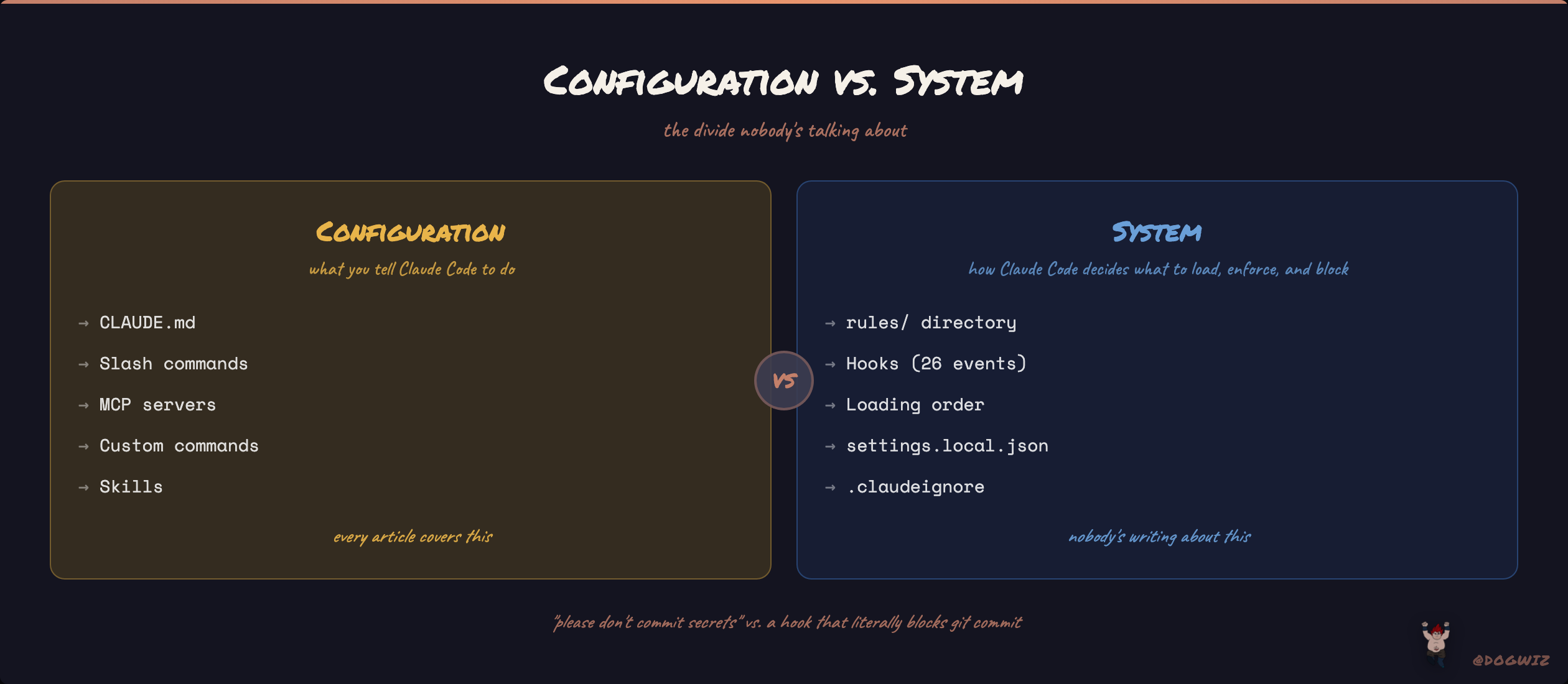
The divide isn't good articles vs bad articles. It's configuration vs system.
Configuration is what you tell Claude Code to do. The system is how Claude Code decides what to load, when to load it, what to enforce, and what to block. Configuration is CLAUDE.md. System is the loading order that walks your directory tree and merges instructions with precedence rules. Configuration is "please don't commit secrets." System is a PreToolUse hook that literally blocks git commit if a .env file is staged.
Every article I read lives on the configuration side. The system side is where Claude Code actually gets powerful — and nobody's writing about it.
What none of them cover
rules/ directory. You can split your CLAUDE.md into modular files inside .claude/rules/. Each rule file can have a paths frontmatter field that scopes it to specific file patterns. A rule in .claude/rules/design-tokens.md with paths: ["**/*.tsx", "**/*.css"] only loads when Claude reads matching files. This means you can have 50 rules without bloating every conversation — they load on demand, scoped to what you're actually working on.
Hooks. 26 event types. PreToolUse, PostToolUse, SessionStart, Stop, FileChanged, WorktreeCreate, and 20 more. Each hook runs a shell command and can block the action based on the exit code. This is how you go from "Claude should follow our coding standards" to "Claude literally cannot merge code that fails the linter." The difference between a suggestion and an enforcement mechanism.
Loading order. CLAUDE.md files are loaded by walking up the directory tree from your current working directory. Project-level CLAUDE.md overrides user-level (~/.claude/CLAUDE.md), which overrides global. Subdirectory CLAUDE.md files are lazy-loaded when Claude reads files in those directories. This is how teams layer instructions — org-wide standards at the top, project-specific rules in the repo, personal preferences in settings.local.json.
settings.local.json. Your permissions and personal config that doesn't get committed to the repo. Critical for teams where the repo has shared settings.json but each developer has their own permission preferences.
.claudeignore. Controls what Claude can see in your project. Like .gitignore but for Claude's file access. If you have a 200MB data directory that's irrelevant to your code, .claudeignore keeps it out of Claude's context.
These aren't obscure features. They're in the official documentation. They're just not in anyone's viral thread.
Why this keeps happening
The content pipeline for developer tools on X works like this: someone reads the docs (or more likely, reads someone else's article), writes a guide, adds engagement hooks, publishes. The next person reads that guide instead of the docs and writes their own version. Within three cycles, the same mistakes are in five articles and the features nobody covered in round one are still uncovered.
The settings.json invented fields are the clearest example. cyrilXBT publishes nested config objects that don't exist. Someone copies the structure into their article. Now there are multiple sources confirming that context.include is a real field. It's not. But good luck figuring that out when three articles show the same config.
The features that get covered are the ones that are easy to demonstrate in a screenshot: CLAUDE.md content, slash commands, MCP connections. The features that don't get covered are the ones that require understanding the architecture: loading order, hooks, path-scoped rules, the settings schema. Configuration is photogenic. Systems are not.
if you made it this far
I'm building my Claude Code setup in public. Not the "here's a settings.json template" kind — the kind where I show the rules directory, the hooks that actually enforce things, the loading order that makes it all work together, and the failures along the way.
I don't have a course to sell you. I don't have a community with a waitlist. I just have a .claude/ directory with 16 commands, 6 rules, production hooks, a framework memory system, and semantic search across 14,000+ files that I've been iterating on for months.
The guides will keep coming. The engagement will keep flowing. But if you want to know what Claude Code actually does — not what sounds good in a thread — I'll be here showing the system layer that nobody else is covering.
Follow @Dogwiz if that's the kind of content you want in your feed.