here's what my .claude/ folder actually looks like
Everyone's sharing their CLAUDE.md. Screenshots of 200-line files with every rule they could think of crammed into one document. "Here's my setup" posts that show you a single file and call it a day.
Nobody's showing the full folder.
I've been running Claude Code as my primary dev environment for weeks now. Not dabbling — building real systems, shipping content, managing an entire life-organization directory through it. The .claude/ folder I ended up with looks nothing like what the guides tell you to build.
Bookmark this. You're going to want to copy pieces of it.
Let's get into it.
the architecture
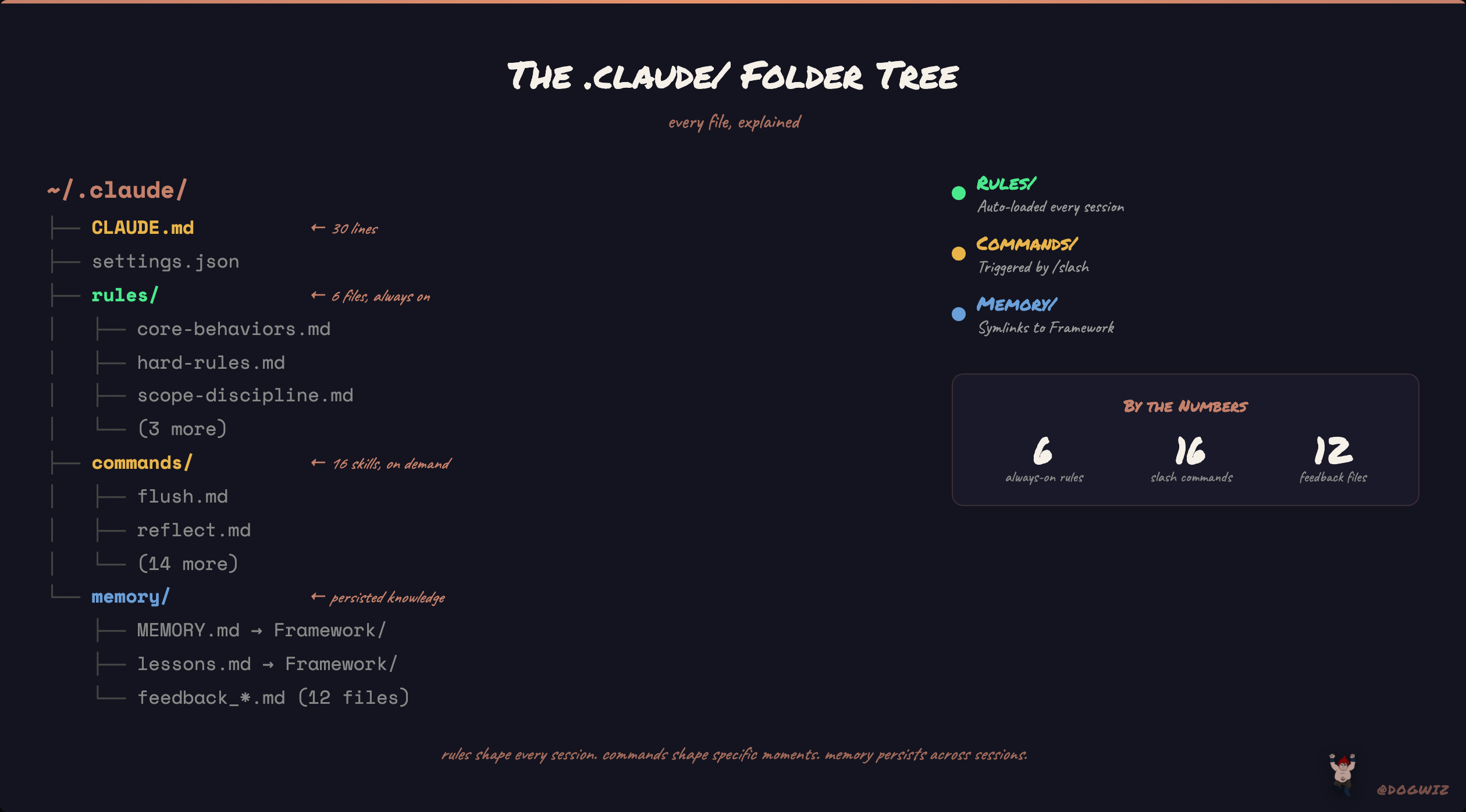
Here's the actual tree. Not a hypothetical — this is what ls returns on my machine right now:
~/.claude/
├── CLAUDE.md              ← 30 lines. that's it.
├── settings.json
├── rules/
│   ├── core-behaviors.md
│   ├── hard-rules.md
│   ├── scope-discipline.md
│   ├── output-templates.md
│   ├── session-search.md
│   └── bird-cli.md
├── commands/
│   ├── flush.md
│   ├── reflect.md
│   ├── debate.md
│   ├── verdict.md
│   ├── research.md
│   ├── prompt.md
│   ├── context.md
│   ├── prune.md
│   ├── content-mine.md
│   ├── scrape-creator.md
│   ├── new-project.md
│   ├── ingest.md
│   ├── file.md
│   ├── eval-guide.md
│   └── autoresearch.md
└── projects/
    └── -Users-lc-LC/
        └── memory/
            ├── MEMORY.md → Framework/MEMORY.md (symlink)
            ├── soul.md → Framework/SOUL.md (symlink)
            ├── agents.md → Framework/AGENTS.md (symlink)
            ├── USER.md → Framework/USER.md (symlink)
            ├── heartbeat.md → Framework/HEARTBEAT.md (symlink)
            ├── lessons.md → Framework/lessons.md (symlink)
            ├── threads.md → Framework/threads.md (symlink)
            ├── infra.md → Framework/infra.md (symlink)
            ├── projects.md → Framework/projects.md (symlink)
            ├── connections.md → Framework/connections.md (symlink)
            └── feedback_*.md (12 files)
6 rules. 16 commands. A memory system wired through symlinks. That's the full picture.
Most people stop at CLAUDE.md. That's like configuring an OS by editing one config file and ignoring everything else the system can load.
why CLAUDE.md is 30 lines
Here's the actual file. The whole thing:
# CLAUDE.md — Global Behavioral Rules

This file defines behavioral rules that apply to **all projects**.
Individual project CLAUDE.md files contain project-specific context
and may override or extend these rules.

## Rules (auto-loaded from `~/.claude/rules/`)

| File | What |
|------|------|
| `core-behaviors.md` | Assumption surfacing, confusion management, push back, simplicity, modes (EXPLORE/SHIP) |
| `scope-discipline.md` | Scope discipline, dead code hygiene, failure modes to avoid |
| `output-templates.md` | PLAN/CHANGES MADE templates, changelog, self-improvement loop |
| `hard-rules.md` | 13 hard rules, workflow (plan mode, verification, elegance, bug fixing) |
| `session-search.md` | Search past sessions before guessing — daily logs → raw transcripts → claude-mem → session JSONLs |

These files are loaded automatically every session. No need to read them manually.

*Last updated: 2026-03-24*
That's it. It's an index. A table of contents pointing to the real rules.
The reason is simple: Claude Code loads ~/.claude/CLAUDE.md and every file in ~/.claude/rules/ at session start. Both get injected into the context window. If you put everything in CLAUDE.md, you get one massive file that's hard to maintain and hard to debug when Claude ignores something. If you split into rules/, you get modular files you can edit independently.
The official docs recommend keeping CLAUDE.md under 200 lines. Most people hit that wall and start cutting rules. The answer isn't fewer rules — it's moving them to rules/ where they auto-load anyway.
I iterated to this thin-index pattern after my CLAUDE.md hit 400+ lines and Claude started selectively ignoring the stuff buried at the bottom. Split it into 6 files, each focused on one concern. Adherence went up immediately.
rules/ — the behavioral layer
Every .md file in ~/.claude/rules/ loads automatically at session start. No frontmatter needed, no imports, nothing. Just drop a markdown file in there and it's active next session.
Here's what each one does and why it exists:
core-behaviors.md — The personality rules. Assumption surfacing (state your assumptions before building), confusion management (stop and ask when something's unclear instead of guessing), push back (disagree when I'm wrong), simplicity enforcement. This file exists because Claude's default mode is sycophantic agreement and over-engineering. These rules counteract both.
## Push Back When Warranted

You are not a yes-machine. When my approach has clear problems:
- Point out the issue directly
- Explain the concrete downside
- Propose an alternative
- Accept my decision if I override

Sycophancy is a failure mode.
hard-rules.md — 13 non-negotiable rules plus the planning workflow. No scope expansion. No new libraries without approval. No file overwrites when surgical edits work. No regressions. These are the rules I added one by one, each after Claude burned me. Rule 7 ("do not add new libraries without approval") came after Claude installed a community MCP server knockoff instead of the official one. Rule 8 ("no regressions") came after a "cleanup" broke working code.
scope-discipline.md — Touch only what you're asked to touch. This one matters more than people think. Claude's instinct is to "clean up" adjacent code while it's in the neighborhood. Rename variables you didn't ask about. Refactor a function next to the one you're editing. This file kills that behavior dead.
## Self-Check (run before submitting any response with code changes)

1. Are you touching something you weren't asked to touch?
2. Did you just "clean up" something adjacent? Revert it.
3. Are you making an assumption right now? Name it.
4. Is this getting bigger than expected? STOP and say so.
output-templates.md — Forces Claude to show its work. Every non-trivial task gets a PLAN block before execution. Every modification gets a CHANGES MADE block after. This file also enforces the self-improvement loop: after any correction from me, Claude writes the pattern to lessons.md so it doesn't make the same mistake twice.
session-search.md — When I say "remember when we did that thing last week," Claude has a five-layer search strategy instead of hallucinating an answer. qmd semantic search first (hybrid BM25 + vector search across 14,000+ markdown files), then daily logs, then transcripts, then indexed memory, then raw JSONL files. This replaced Claude confidently making up what happened in previous sessions.
bird-cli.md — Short and specific. Any time Claude needs to touch X/Twitter content, use xread (Playwright-based browser automation). Bird CLI is dead — Twitter blocks all cookie-based GraphQL scraping. Exists because every scraping approach failed until we built a Playwright-based reader.
commands/ — the skill system
Commands are slash commands you invoke with /name. They don't auto-load — they only fire when you call them. This is the key difference from rules: rules shape every session, commands shape specific moments.
Here's the full lineup:
/flush — Session closeout. This is the most important command I built. When I'm done working, /flush captures a structured summary to the daily log, extracts action items, updates thread status, runs a thread health check (WIP limits, stale drafts, blocked items), and archives the transcript. It's 150 lines of instructions that turn "end of session" into a reliable state snapshot.
/reflect — Weekly knowledge extraction. Scans the last 7 daily logs, pulls out durable lessons, routes them to the right domain file (mistakes go to lessons.md, tools go to infra.md, people go to connections.md). Prevents the memory system from going stale.
/debate — Dialectic review for decisions. Spawns two agents arguing opposite sides, then a referee picks the winner. I use this when I'm going in circles on a tradeoff. "Should I use Obsidian Sync or git to sync files to EC2?" — one agent argues for, one against, a third decides. Kills analysis paralysis.
/verdict — Article evaluator. I read a lot of "Claude Code setup" articles on X. This command fetches the article via xread, checks every claim against the official docs and my actual setup, scores it on 5 dimensions (factual accuracy, depth, completeness, originality, engagement farming), and generates a comment-ready verdict. Built it after seeing too many articles with invented settings.json fields getting thousands of bookmarks.
/research — Anti-hallucination mode. Every claim needs a citation. Every factual statement needs a source file or URL. Unsourced claims get retracted. This is for when accuracy matters more than speed — financial research, technical deep dives, anything where "sounds right" isn't good enough.
/prompt — Brain dump translator. I think fast and messy. This takes a rambling voice-to-text blob and restructures it into GOAL / INPUTS / STEPS / OUTPUT / CONSTRAINTS format. Then asks "execute this?" and does it on confirmation.
/context — Knowledge graph walker. Given a topic, it searches bookmark notes, entity pages, the SQLite database, daily logs, and domain files to build a context bundle. When I say "load context on Obsidian plugins," it finds everything I've saved, every session I've discussed it, every related entity.
/prune — Memory auditor. The auto-memory system accumulates files over time. This command inventories everything, checks for staleness and bloat, calculates the token cost of what's loaded every session, and recommends trims. Keeps the memory lean.
/content-mine — Surfaces publishable content from my bookmarks, daily logs, and session discoveries. Ranks candidates by originality, specificity, and timeliness. Mining my own knowledge system for posts instead of staring at a blank compose window.
/scrape-creator — Visual content scraper. Point it at an X account and it fetches their media tweets, downloads images, analyzes the visual style, and generates a structured reference file. I use these reference files to study what works visually for different creators.
/new-project — Project scaffolding. Generates 10 docs (PRD, tech stack, design system, implementation plan, progress tracker, etc.), inits git, and asks if I want to start building.
/ingest — External content ingestion. Point it at a URL or paste text, it extracts insights and routes them to the right domain files. Turns random things I encounter into structured knowledge without manual filing.
/file — Quick-save an insight mid-conversation to any domain file. One command, no ceremony. When something comes up worth remembering, /file drops it where it belongs without breaking flow.
/eval-guide — Evaluation framework for testing command and skill quality. Defines binary pass/fail criteria so I can measure whether changes to prompts actually improve output.
/autoresearch — Autonomous skill optimizer. Runs a command repeatedly, scores outputs against binary evals, mutates the prompt, and keeps improvements. Based on Karpathy's autoresearch methodology — let the machine iterate on its own prompts.
the memory layer nobody talks about
This is where it gets interesting. Claude Code has an auto-memory system that stores notes in ~/.claude/projects/<project>/memory/. Most people let it write whatever it wants to MEMORY.md and call it done.
I replaced that entire approach.
The real files live in an Obsidian vault at ~/LC/OBSIDIAN/Ideaverse/Framework/. The memory/ directory is populated with symlinks pointing there. This means the same files are readable in Obsidian as wiki-linked notes AND loaded by Claude Code as auto-memory. One source of truth, two interfaces.
The Framework has five core files:
AGENTS.md — Operating rules. How Claude behaves in my environment: session lifecycle (what to read at startup, what to write at closeout), autonomy levels (what Claude can do alone vs what needs approval), file loading order. This is the "how" file.
## Autonomy Levels

| Action | Level | Rule |
|--------|-------|------|
| Read any file | autonomous | Always allowed |
| Append to daily log | autonomous | Always do at session end |
| Update HEARTBEAT | autonomous | When project status clearly changed |
| Update domain files | ask first | Show proposed additions |
| Modify SOUL | never autonomous | User-initiated only |
SOUL.md — Personality definition. Short file that shapes tone: concise over verbose, code over explanation, direct over diplomatic. The "what to never do" section kills the default Claude behaviors that waste time — "Great question!", repeating the question back, hedging when confident.
USER.md — User context file. My working style, preferences, constraints. Claude reads this to calibrate how it operates with me specifically.
HEARTBEAT.md — Active state. Current projects, their status, what's blocked, what shipped recently. This is the "where are we" file that prevents Claude from asking "what are you working on?" every session.
MEMORY.md — A 33-line index. That's it. It points to domain files (lessons.md, threads.md, infra.md, projects.md, connections.md) and feedback files. The index pattern again — MEMORY.md is a table of contents, not a dumping ground.
There are also 12 feedback files — these are corrections I've made that got encoded as persistent context. When Claude kept trying to WebFetch x.com URLs, instead of correcting it every session, I created feedback_bird_cli.md. When it kept expanding scope beyond what I asked for, feedback_session_focus.md. These files are behavioral patches that persist across sessions.
The system now includes qmd — a hybrid BM25 + vector search engine indexing 14,000+ files across all memory, daily logs, bookmarks, and project files. When Claude needs to recall something, it searches the actual files, not just the compiled memory. This is a massive upgrade over the early days of "just read MEMORY.md and hope it's in there."
what auto-loads vs what doesn't
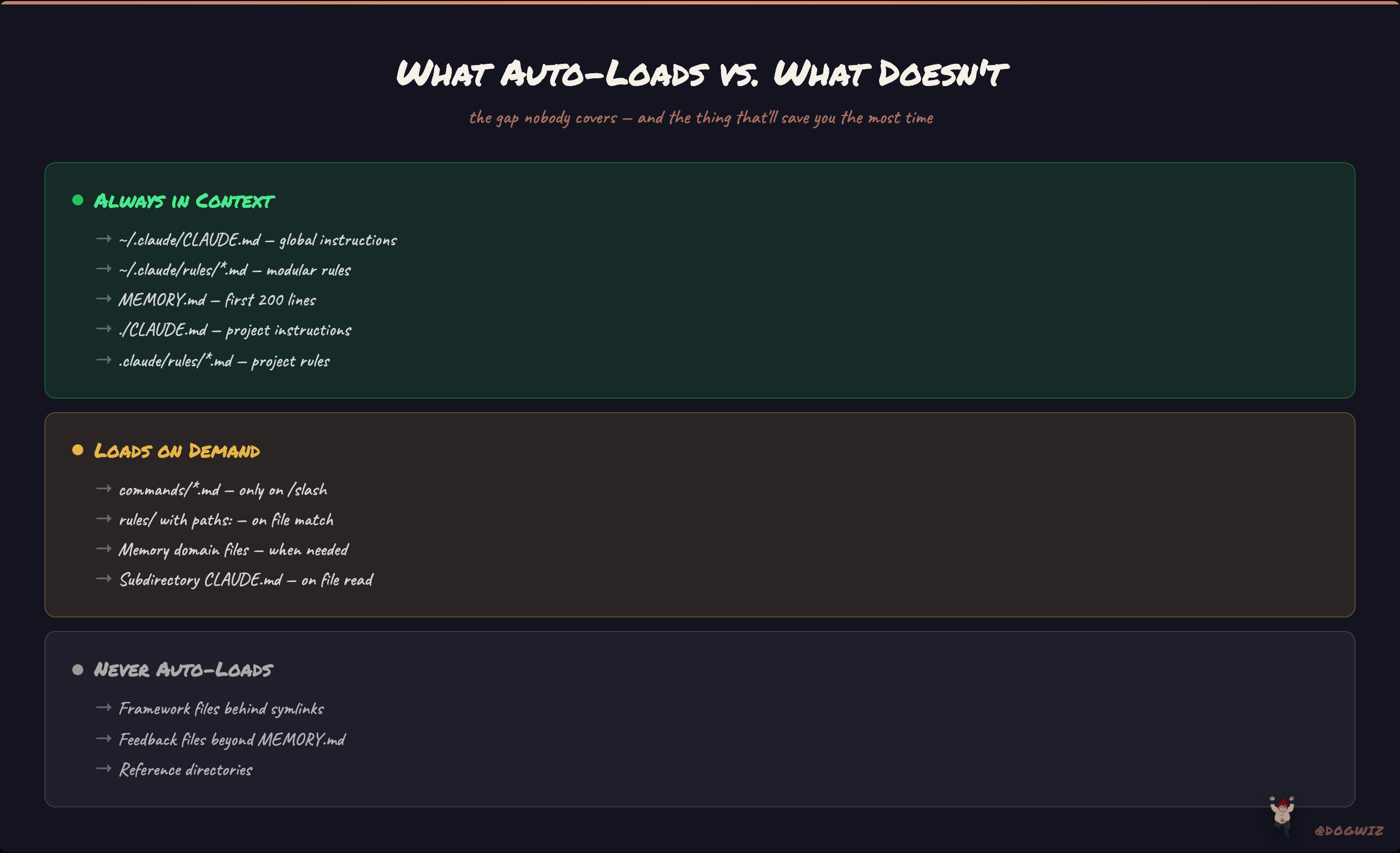
This is the gap nobody covers, and it's the thing that will save you the most time understanding.
Loads at session start (always in context):
~/.claude/CLAUDE.md— your global instructions- Every
.mdfile in~/.claude/rules/— your modular rules ~/.claude/projects/<project>/memory/MEMORY.md— first 200 lines of auto-memory- Project-level
./CLAUDE.mdor./.claude/CLAUDE.md— project instructions - Every
.mdfile in./.claude/rules/— project-level rules (if nopaths:frontmatter)
Loads on demand (only when triggered):
~/.claude/commands/*.md— only when you type/command-name.claude/rules/files withpaths:frontmatter — only when Claude reads matching files- Auto-memory domain files beyond MEMORY.md — Claude reads them when it needs the info
- CLAUDE.md files in subdirectories — load when Claude reads files in those dirs
Never auto-loads (Claude must explicitly read):
- Framework files behind symlinks (AGENTS.md, SOUL.md, USER.md, HEARTBEAT.md) — my MEMORY.md index tells Claude to read these at session start, but it's a soft instruction, not a hard load
- Feedback files deeper than MEMORY.md — Claude reads them on-demand from the index
- Reference directories — there when needed, not burning context otherwise
The mental model: rules/ is your always-on behavioral layer. commands/ is your on-demand toolkit. memory/ is your persistent knowledge base with a thin index.
If you put everything in CLAUDE.md, every instruction competes for attention in the same block of text. Split them by loading strategy and each piece gets read at the right time with the right priority.
what I'd do differently
I'd start with rules/ from day one instead of cramming everything into CLAUDE.md and splitting later. The migration took a full session of untangling what's a rule vs what's a command vs what's memory.
I'd build /flush first. Session continuity is the single highest-leverage thing you can add. Without it, every session starts from zero. With it, Claude picks up exactly where you left off.
I'd keep MEMORY.md as a strict index from the beginning. I let it grow to 100+ lines before realizing the auto-memory system works better as a pointer system than a notebook.
And I'd write fewer rules upfront, more rules reactively. Every rule file I have exists because Claude did something wrong and I encoded the correction. The rules that stuck are the ones born from actual friction, not hypothetical best practices.
if you made it this far, you now have a complete map of a .claude/ folder that's been through weeks of real iteration. not a template — a system that evolved from daily use and daily frustration.
honestly, the folder structure matters less than the philosophy behind it: thin indexes that point to modular files, clear separation between always-on rules and on-demand commands, and a memory layer that keeps the agent oriented across sessions without burning your entire context window on startup.
this whole setup is still evolving. every session surfaces something new to encode. that's the point — the .claude/ folder isn't a config you set and forget. it's a living system that compounds.
if you're building with Claude Code and want to see more of what's actually working (and what's not), follow along. i'm posting the real stuff, not the highlight reel.
@Dogwiz